Reviewing team applications
3 min read
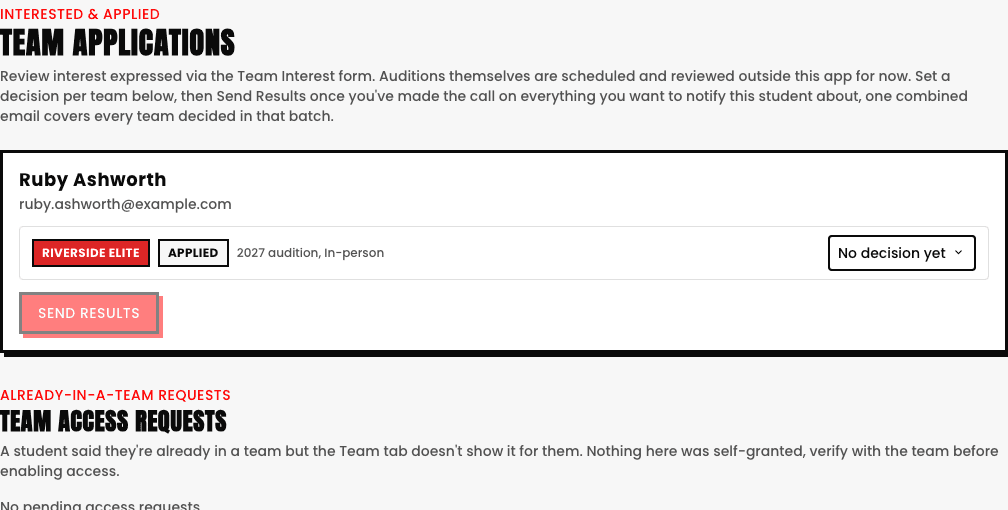
Nobody joins a team by simply booking a slot, they register interest via the Team Interest form first, and Team Applications is where you review that queue. Auditions themselves are still scheduled and reviewed outside the app for now, this page is specifically for recording your decision once that's happened and notifying everyone at once.
Interested & Applied: reviewing new interest
- Each applicant's row shows their team, current status, recorded audition availability (In-person or Online), and an intro video link if they submitted one.
- A per-applicant dropdown lets you set No decision yet, Accept, or Reject, your real, individual call on that one applicant.
- Once you've worked through a team's batch, Send Results notifies everyone you've made a decision on in one combined email, rather than messaging each applicant one at a time.
Team Access Requests: a completely different queue
Sometimes a student insists they're already in a team, but their own Team tab doesn't show it. This second section is where those requests land, nothing here was self-granted by the student, verify with the team before using Grant Access or Reject on a request.
A studio with zero teams configured doesn't see either queue at all
Team Applications only shows up in your sidebar once you've actually created your first team, an empty, unused review queue never clutters the nav for a studio that hasn't set Team up yet.
See also