Instructor onboarding compliance
3 min read
The same self-setup form covered in the previous article now also walks a new instructor through a few real compliance items before they can finish, no separate flow, just added steps in one place.
The three fixed items, always required
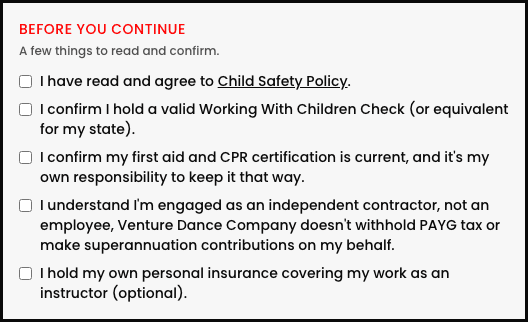
- WWCC (Working With Children Check). "I confirm I hold a valid Working With Children Check (or equivalent for my state)."
- First aid / CPR. "I confirm my first aid and CPR certification is current, and it's my own responsibility to keep it that way."
- Contractor status. A plain acknowledgment that they're engaged as an independent contractor, not an employee, no PAYG tax withheld or superannuation contributed on their behalf.
This is self-attestation, not verification
Personal insurance: the one optional item
A fourth checkbox, "I hold my own personal insurance covering my work as an instructor," is marked optional right in its own label and never blocks setup from completing.
Adding your own policy links
From the Instructors page, the Instructor onboarding policies panel lets you add any policy your studio needs instructors to read and agree to, a Child Safety Policy, a Code of Conduct, whatever's relevant, each one just a title and a real link, shown as its own required checkbox on the setup form alongside the three fixed items above.
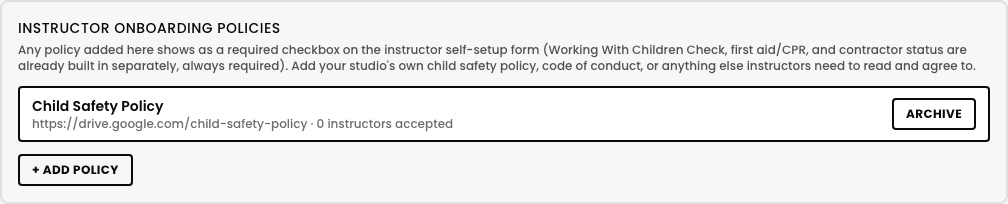
- 1Tap + Add policy.
- 2Give it a real Title (e.g. "Child Safety Policy") and a Link to the actual document, wherever it's hosted.
- 3Tap Add. It shows immediately as a required checkbox for anyone completing setup from now on.
Archiving a policy doesn't erase past acceptances
What the instructor actually sees
A boxed section headed "Before you continue" sits right above where they choose their password, one checkbox per policy you've added, then the three fixed items, then the optional insurance one. Submit is blocked with a plain, specific message until every required box is checked, nothing silently skipped.
Checking compliance status
Any instructor who has a login but hasn't checked every required box shows a red "Compliance incomplete" badge right next to their name on the Instructors list, easy to spot without opening each profile individually.
No automatic re-prompt for policies added later