Adding a second contact to a family
2 min read
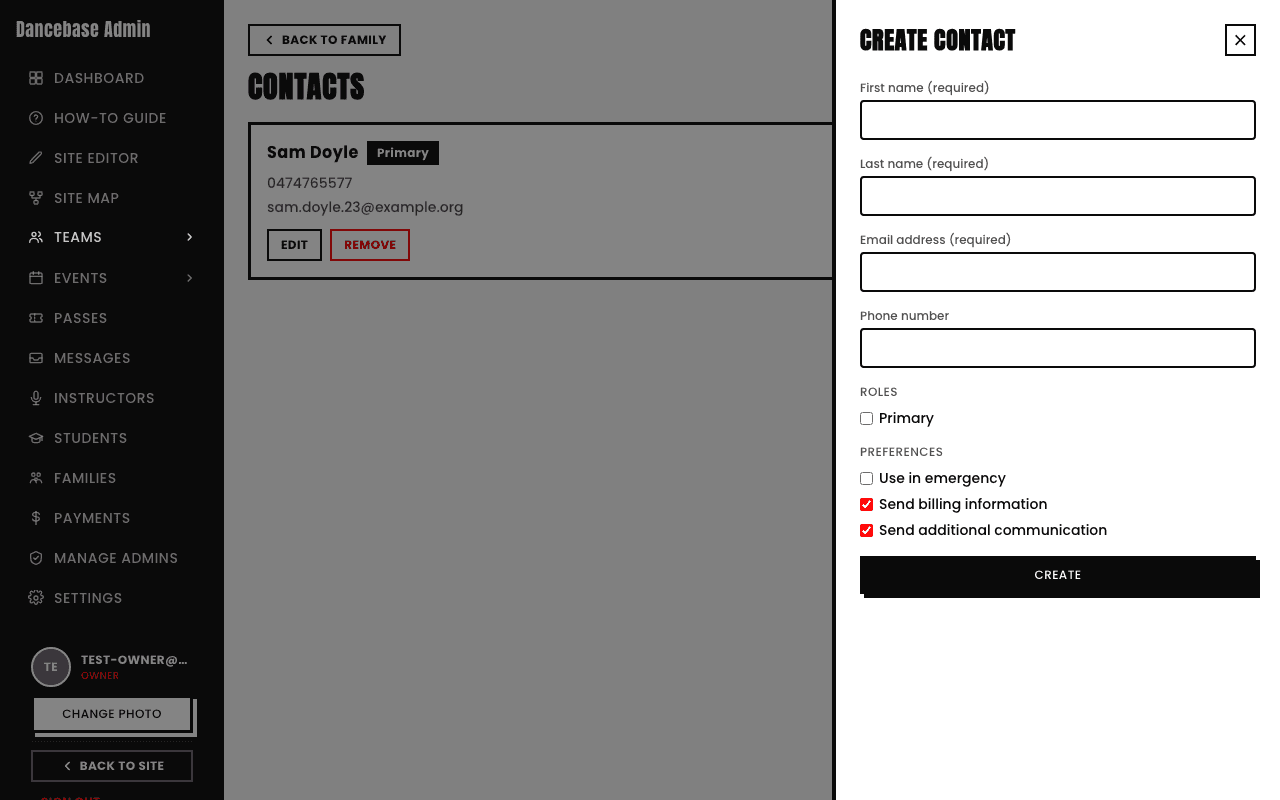
A family isn't limited to one adult. From a family's own Contacts tab, tap Create to add a second parent or guardian as a genuine additional contact.
What you set when adding one
- Name, email, phone. Name and email are required, phone is optional.
- Primary role. Leave unchecked for a genuine second contact, only one contact can hold this at a time.
- Use in emergency. Off by default, turn it on if this person should be treated as an emergency contact.
- Send billing information / Send additional communication. Both on by default, so a newly added contact is included in your studio's messages unless you deliberately opt them out.
What a second contact can and can't do
- Can log into the family portal and see the household's own activity.
- Can't change payment methods, add or remove children, or change another family member's settings, those stay reserved for the primary contact specifically.
Quick answers
Can a second contact be promoted to primary later?
This is a real, meaningful change to who controls the family's billing and settings, worth treating deliberately rather than as a routine toggle if you ever need it.
Does a second contact get their own portal login?
Yes, their own real login, distinct from the primary contact's, seeing the same household but with the smaller set of powers described above.
See also