Cancelling a booking from the family portal
3 min read
Any family can cancel one of their kids' upcoming bookings straight from the portal, right where that booking is already listed on the child's dashboard. It's the same cancellation a directly-logged-in student gets, not a smaller, family-portal-only version of it, so there's nothing you need to do on your end unless a family asks you to step in.
What a family actually sees
A regular event is the simple case, cancel and it's a straight refund, there's no credit concept for a one-off event. A booking against a category (a weekly class, a term session, anything billed through the category system) is different: cancel it while you're still inside that category's own cancellation window, and the family gets a real choice instead of a plain confirm.
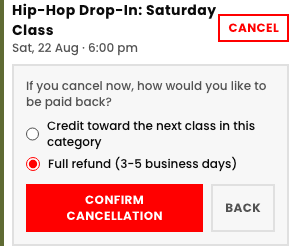
- Credit toward the next class in this category. Stays on the student's own account, applied automatically the next time they book anything in that same category.
- Full refund. Goes back the way it was paid, 3-5 business days, same timeline a directly-logged-in student's own cancellation already gives.
Outside the window, cancelling still cancels, it just doesn't pay back
Where the window itself comes from
The cancellation window isn't a family-portal setting on its own, it's the exact same one you already set for the whole category (Categories → that category → Capabilities → cancellation window). Change it there and every family's cancel screen follows immediately, along with a directly-logged-in student's own.
Quick answers